
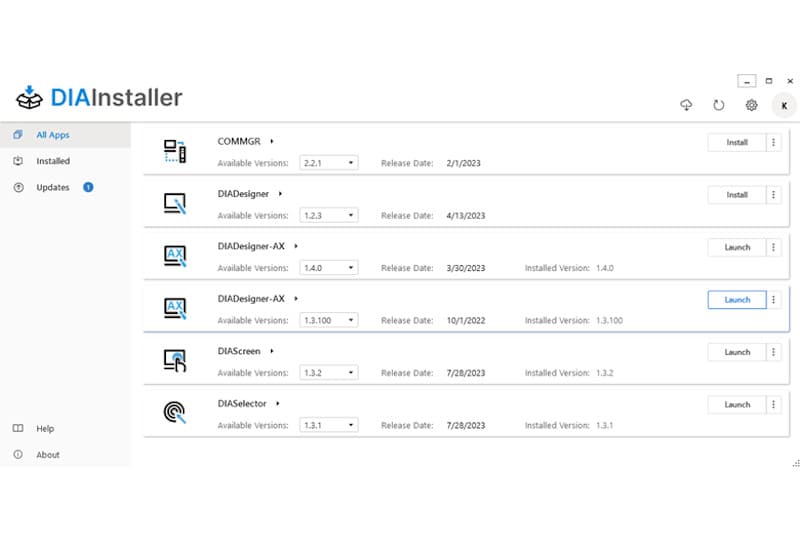
DIAInstaller is the free Delta Electronics tool for downloading, installing, updating and launching the DIAStudio software suite. Instead of downloading each program separately, you install DIAInstaller once and manage all your Delta engineering software from a single window. The current version is DIAInstaller 2.3.0.
What is DIAStudio?
DIAStudio is Delta’s integrated engineering platform for its industrial automation products. It brings together product selection, IEC 61131-3 programming, parameter settings, machine tuning and HMI configuration for Delta PLCs, HMIs, servo drives and motors, and AC motor drives. DIAInstaller is the entry point to all of these tools, including DIADesigner and DIADesigner-AX.
Which DIAInstaller version should I use?
| Version | Release | Status |
|---|---|---|
| DIAInstaller 2.3.0 | April 2024 | Current version, available from the DIAStudio website |
| DIAInstaller 2.1.0 | October 2023 | Introduced the new interface (see features below) |
| DIAInstaller 1.0 series (1.1.x, 1.2.x) | 2022–2023 | Discontinued: from January 2024 it no longer receives new DIAStudio software and has been removed from Delta download sites |
If you still use a 1.x version, Delta recommends replacing it with DIAInstaller 2.3.0, which covers all the functions of the old series.
How to download DIAInstaller
- Go to the official DIAStudio website and register (free). Registration is required to download.
- Open the Download Center and select the latest DIAInstaller version.
- Download the ZIP file, extract it and run DIAInstaller.exe.
- Sign in with your DIAStudio account, choose the software you need (for example DIADesigner) and click Download to install it.
- DIAInstaller will notify you when updates or patches are available and can install them automatically.
Download Delta software only from the DIAStudio website or the Delta official download center, to make sure you get the right version and avoid modified installers.
Main features of DIAInstaller 2.x
Version 2.1.0 introduced the redesigned DIAInstaller, focused on simplicity and functionality. These are its main features:
A new user interface
A left-hand navigation bar gives access to all available DIAStudio software, the applications already installed and the available updates.
Major versions and patches in one step
DIAInstaller detects whether the main version is already installed. If it is not, it downloads and installs both the main version and the patch together, so you are up to date in one step.
Disk space and release notes
Before installing, you can see the disk space each program needs, and you can open the release notes of every version of each DIAStudio tool directly from DIAInstaller.
Launch the software after installation
Installed DIAStudio programs can be started directly from DIAInstaller.
Related articles
- Delta manuals and software downloads
- Delta DIADesigner-AX training: overview
- DIADesigner-AX training: electronic cams
- AS04SIL-A IO-Link module for the Delta AS PLC series