
Every servo axis needs a target. In motion control, you can give that target in two ways: as an absolute position or as a relative distance. The choice looks small. However, it changes how your machine behaves after a stop, a slip or a power cycle. This guide explains both movements and shows how to program them on a Siemens S7-1500 in TIA Portal.
What is an absolute movement?
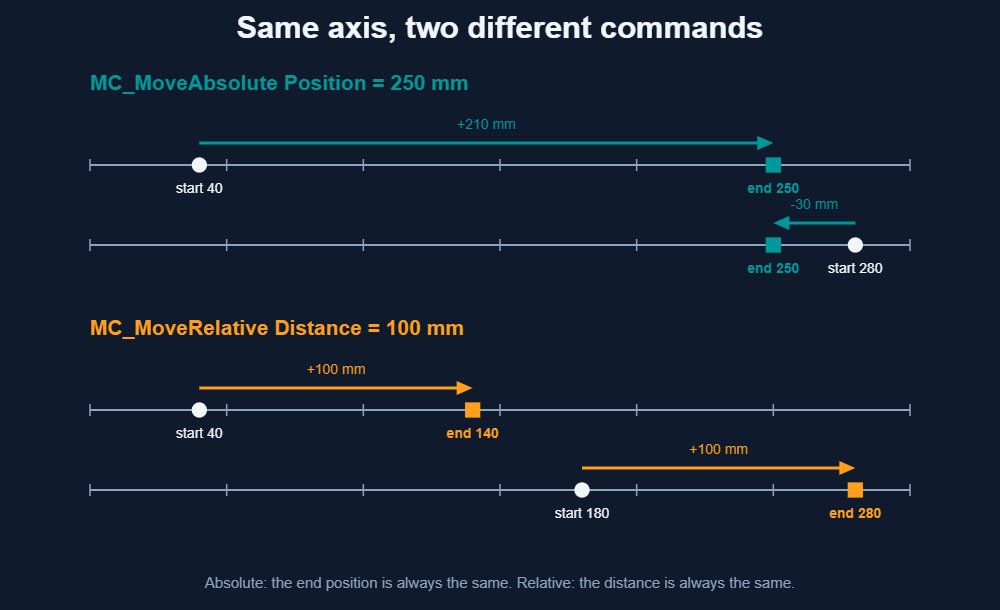
An absolute movement sends the axis to a fixed coordinate. You say “go to 250 mm”, and the axis goes there. It does not matter where the axis starts. If it is at 40 mm, it moves forward 210 mm. If it is at 280 mm, it moves back 30 mm.
This only works if the controller knows the real position. Therefore, the axis must be homed first. Homing links the encoder value to the machine coordinate system. With an absolute encoder, you do this once during commissioning. With an incremental encoder, you repeat it after every power-up.
What is a relative movement?
A relative movement adds a distance to the current position. You say “move 100 mm”, and the axis travels exactly that far from wherever it is. Start at 40 mm and you end at 140 mm. Start at 180 mm and you end at 280 mm.
The axis does not need to be homed. It only needs to be enabled. This makes relative moves ideal for indexing, feeding and pitch-based tasks, where the distance matters more than the coordinate.
Absolute vs relative at a glance
| Feature | Absolute movement | Relative movement |
|---|---|---|
| Siemens instruction | MC_MoveAbsolute | MC_MoveRelative |
| Main input | Position | Distance |
| Result | Same end position every time | Same travelled distance every time |
| Homing required | Yes | No |
| Position errors | Corrected at every move | Can accumulate over many cycles |
| Typical use | Pick-and-place, recipes, fixed stations | Indexing, feeding, cut-to-length |
How the commands reach the servo
On an S7-1500, you do not move the motor directly. Instead, your program calls PLCopen-style Motion Control instructions. Those instructions talk to a technology object, which holds the axis configuration, limits and profile generator. The object then sends setpoints to the drive over PROFINET.
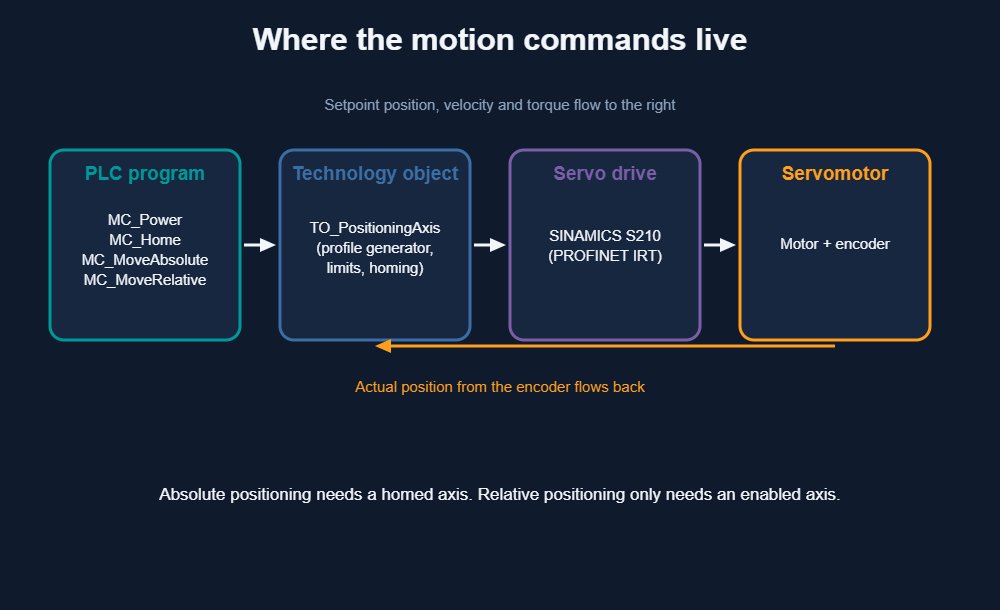
First, add a positioning axis technology object under Technology objects in the project tree. Then link it to the drive and the encoder in the axis configuration. After that, the instructions below can use it as the Axis parameter. Siemens documents every instruction in its S7-1500 Motion Control function manual.
Example 1: enable and home the axis
Before any absolute move, enable the axis with MC_Power and home it with MC_Home. The SCL code below shows both calls.
// Enable the axis
"MC_Power_DB"(Axis := "Axis_1",
              Enable := #bEnable,
              StartMode := 1,
              StopMode := 0,
              Status => #bAxisEnabled,
              Error => #bPowerError);

// Active homing (needs a reference switch)
"MC_Home_DB"(Axis := "Axis_1",
             Execute := #bHome,
             Position := 0.0,
             Mode := 3,
             Done => #bHomed,
             Error => #bHomeError);
Example 2: absolute positioning
Now the axis can go to a fixed coordinate. In this example, a rising edge on bGoPick sends the axis to 250 mm at 100 mm/s. The same call works from any start position. For more details, see the Siemens MC_MoveAbsolute reference.
"MC_MoveAbsolute_DB"(Axis := "Axis_1",
                     Execute := #bGoPick,
                     Position := 250.0,
                     Velocity := 100.0,
                     Done => #bPickDone,
                     Busy => #bPickBusy,
                     Error => #bPickError,
                     ErrorID => #wPickErrorId);
Store the target positions in a recipe data block instead of typing them in the code. As a result, operators can change a station position without touching the program.
Example 3: relative positioning
A relative move suits a feeder that advances one pitch per cycle. Here, every pulse on bIndex moves the axis 120 mm, regardless of its current coordinate.
"MC_MoveRelative_DB"(Axis := "Axis_1",
                     Execute := #bIndex,
                     Distance := 120.0,
                     Velocity := 200.0,
                     Done => #bIndexDone,
                     Busy => #bIndexBusy,
                     Error => #bIndexError,
                     ErrorID => #wIndexErrorId);
Practical tips
- Mind command overrides. On the S7-1500, a new positioning command aborts the one still running. Therefore, wait for Done before you start the next move, or accept the abort on purpose.
- Use a rising edge on Execute. The instruction starts on the edge. Keep Execute high until Done, Error or CommandAborted reports back.
- Watch error build-up. If the load can slip, a long chain of relative moves drifts. In that case, finish each cycle with an absolute move or a new homing run.
- Use modulo axes for rotary tables. On a modulo axis, the position repeats every turn. The absolute instruction then lets you choose the direction, including the shortest path.
Which one should you choose?
Use absolute moves when positions have a meaning in the machine, such as stations, recipes or end stops. Use relative moves when the distance is the goal, such as a feed length or a pitch. Many real machines combine both. For example, the axis homes once, indexes with relative steps and returns to a safe position with an absolute move.
If you are new to the software, start with our guide to what TIA Portal is and then install the TIA Portal V21 trial to test these examples in simulation. You can also review the motion control improvements in the TIA Portal V21 technical slides. More Siemens news is available in the Siemens category.