
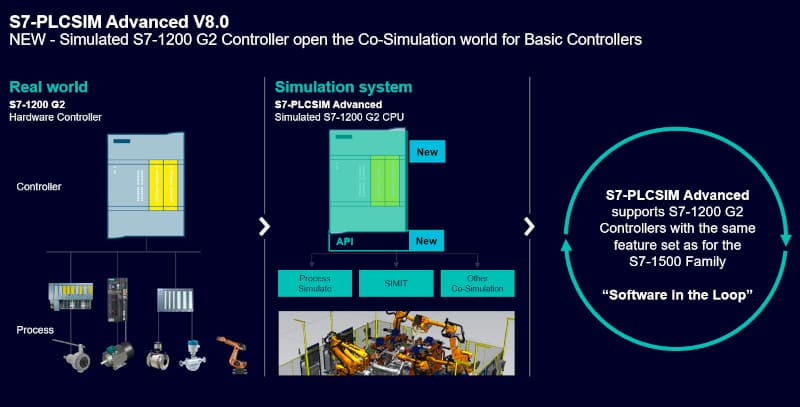
SIMATIC S7-PLCSIM Advanced V8.0 is the latest version of the Siemens simulator for creating virtual S7-1500, S7-1200 G2 and ET 200SP controllers on your PC. Siemens offers it with a free trial licence, so you can test your TIA Portal projects without any hardware. Here we explain what is new in V8.0, how to download the trial and how it differs from the standard S7-PLCSIM.
S7-PLCSIM, S7-PLCSIM Advanced and S7-PLCSIM Classic: what is the difference?
The Siemens PLCSIM family has been enabling virtual testing and commissioning for more than two decades. Today it has three main products:
| Product | Controllers | Typical use |
|---|---|---|
| S7-PLCSIM (Standard) | S7-1200, S7-1500 | Basic logic testing inside TIA Portal; licensed with STEP 7; current version V21 |
| S7-PLCSIM Advanced | S7-1500, S7-1200 G2, ET 200SP, ET 200pro, Drive Controller, Software/Open Controller | High-fidelity simulation, multiple controllers, TCP/IP, OPC UA, web server and API for digital twins |
| S7-PLCSIM Classic | S7-300, S7-400 | Legacy projects in STEP 7 V5.x; current version V5.4 SP8 |
Choose PLCSIM Advanced when you need communication with other systems (HMI, OPC UA clients, robots, SCADA), several virtual PLCs at the same time, or a connection to simulation tools such as SIMIT or NX Mechatronics Concept Designer for virtual commissioning.
What’s new in S7-PLCSIM Advanced V8.0
New PLC types
- All article numbers of the S7-1200 G2 with firmware V4.1
- Firmware version 1.0 of the S7-1200 G2 is also supported
- Software/Open Controller with firmware version 40.1
New functions
- The communication connections of the PLCSIM Runtime Manager are now encrypted
- New API for simulating the PLC display
- The TCP/IP adapter now also accepts WLAN/Wi-Fi connections
- Support for API versions from V3.0 to V8.0
Compatibility
S7-PLCSIM Advanced V8.0 supports TIA Portal projects from V14 to V21 and CPU firmware levels V1.8 to V4.1.
How to download the S7-PLCSIM Advanced V8.0 trial
- Log in to Siemens Industry Online Support with your mySiemens account (registration is free).
- Open the official entry SIMATIC S7-PLCSIM Advanced V8.0 download incl. TRIAL license (entry ID 109990051).
- Download the ISO image SIMATIC_S7-PLCSIM_Advanced_V8.iso.
- Mount the ISO, run the setup as administrator and follow the installation wizard.
- Restart the PC. The trial licence lets you use the full product for a limited period (21 days); after that you need a licence managed with the Automation License Manager.
Tip: install S7-PLCSIM Advanced after TIA Portal, and make sure the Siemens PLCSIM Virtual Ethernet Adapter is enabled in Windows if you want to reach the virtual PLC from other applications over TCP/IP.
Keep PLCSIM Advanced up to date
In July 2026 Siemens published a security advisory (SSA-828211, CVE-2026-54429) describing a denial-of-service vulnerability in S7-PLCSIM Advanced, and recommended countermeasures until fixed versions are available. Download only from Siemens and check the support entry regularly for updates. More information (CISA ICSA-26-209-03).
Related articles
- Getting Started SIMATIC S7-PLCSIM Advanced
- Improvements in S7-PLCSIM V20 Upd1
- How to download the TIA Portal V21 trial
- TIA Portal system requirements (V18–V21)