

PNP and NPN are terms you meet constantly in industrial automation: when choosing a three-wire proximity sensor or photoelectric sensor, when selecting PLC input and output cards and, above all, when drawing schematics and wiring a machine. Mixing them up is one of the most common reasons why a sensor “works” (its LED lights up) but the PLC never sees the signal.
In short: a PNP output is a sourcing output (it switches the positive supply to the load) and an NPN output is a sinking output (it switches the load to 0 V). This guide explains the difference, how to wire each type to a PLC and how to tell which one you have.
PNP vs NPN: quick comparison
| PNP (sourcing) | NPN (sinking) | |
|---|---|---|
| What the output switches | +24 V (positive side) | 0 V (negative side) |
| Load connected between | Output and 0 V | +24 V and output |
| Output voltage when active | ≈ +24 V | ≈ 0 V |
| Matching PLC input type | Sinking input (input common to 0 V) | Sourcing input (input common to +24 V) |
| Where it is more common | Europe | Asia (especially Japan) and parts of America |
What is the difference between PNP and NPN?
The names come from the transistor used in the output stage of the sensor. In a PNP sensor, the transistor sits between the positive supply and the output, so when it switches on it “sources” current into the load. In an NPN sensor, the transistor sits between the output and 0 V, so when it switches on it “sinks” current coming from the load.


Three-wire sensor wire colours
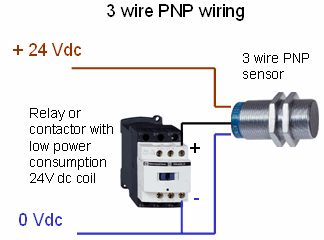
Most three-wire DC sensors use the standard colour code of IEC 60947-5-2:
- Brown (BN): +24 V DC supply
- Blue (BU): 0 V
- Black (BK): switching output (PNP or NPN)
- White (WH): second output, on four-wire sensors
The supply wiring is identical for both types; only the behaviour of the black output wire changes. With a PNP sensor, the black wire goes to +24 V when the sensor detects; with an NPN sensor, it goes to 0 V.
How to wire PNP and NPN sensors to a PLC
PLC inputs
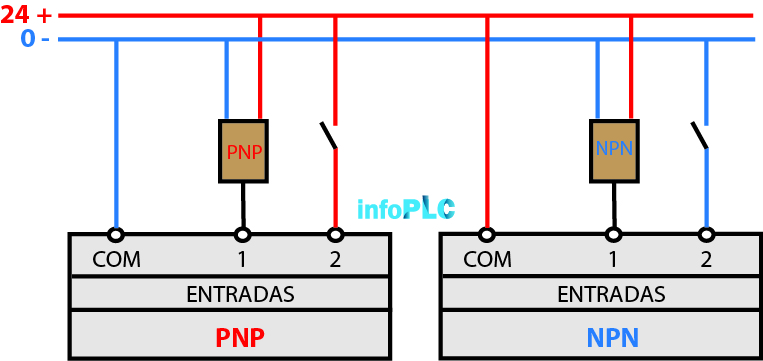
Many PLC input cards can work with both types; it depends on how you wire the input common (COM). With PNP sensors, connect the input common to 0 V: the sensor applies +24 V to the input and the card works as a sinking input. With NPN sensors, connect the common to +24 V: the sensor pulls the input to 0 V and the card works as a sourcing input. Check the card datasheet: some inputs, for example the standard IEC 61131-2 inputs used on most European PLCs, are designed for PNP sensors only.
PLC outputs
For transistor outputs you must order the right type: a PNP (sourcing) output card switches +24 V to the load, while an NPN (sinking) output card switches the load to 0 V. Relay outputs are potential-free contacts, so they can be wired either way.

Which one should I use: PNP or NPN?
Neither is technically better for general on/off detection, and both types are available for sensors and PLC cards. In practice the choice depends on:
- Region and standards: PNP is the usual choice in Europe; NPN is widespread in Asian machines.
- The existing machine: before modifying or extending an installation, check the type of inputs already used and stay consistent.
- Spare parts and stock: using one type across the plant simplifies maintenance.
- Safety in case of a fault: with PNP wiring, a damaged signal wire touching earth or 0 V switches the input off rather than on, which many designers prefer.
How to check whether a sensor is PNP or NPN
- Read the label or the datasheet: it is usually printed as PNP/NPN or as a wiring diagram.
- Power the sensor (brown to +24 V, blue to 0 V) and activate it.
- Measure the black wire with a multimeter against 0 V. About +24 V when active means PNP.
- If you read nothing against 0 V, measure between +24 V and the black wire. About 24 V when active means NPN.
If your PLC inputs do not match your sensors, you can use sensors of the other type, change the input common if the card allows it, or add interface relays or converters.
Related articles
- SIMATIC S7-1200 G2: external encoder and HSC inputs
- IO-Link module for the Delta AS PLC series
- Industrial sensors news
- PLC, PAC and controller news