
Siemens has released version 1.2 of LIBelt, its “Intelligent Belt” application example for controlling multi-belt systems with SIMATIC S7-1500, S7-1500T and, new in this release, S7-1200 G2. The library is aimed at production machines, mainly in the packaging industry.
What an Intelligent Belt does
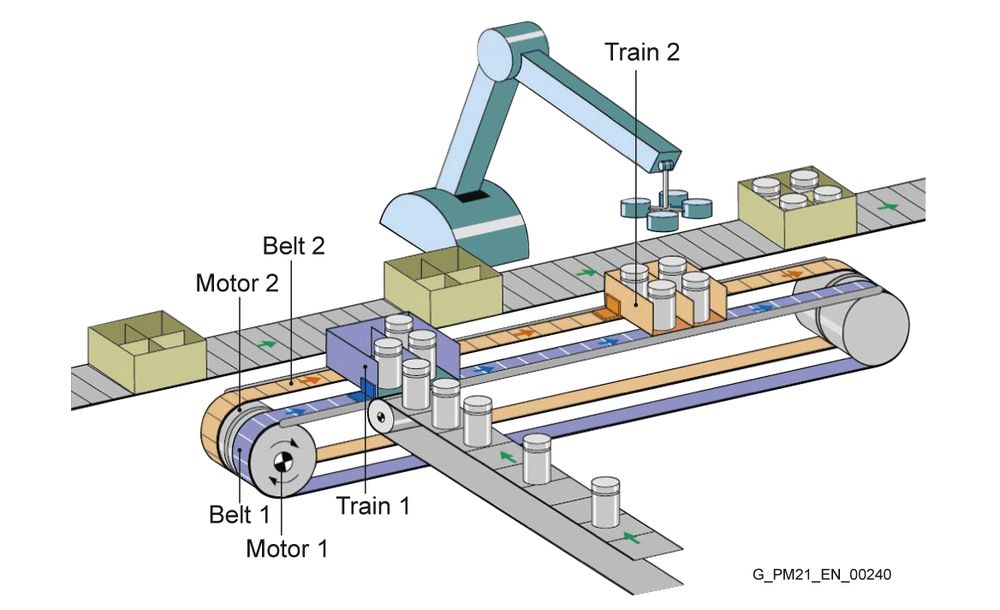
The application picks up products that arrive one after another and delivers them grouped at an unloading position. Its defining feature is that loading and unloading are independent: several belts or chains share the same track, each with its own drive and one or more trains of pockets. One train can therefore be loaded while another is moving or being unloaded, for example by a robot.
Parameterizing instead of programming
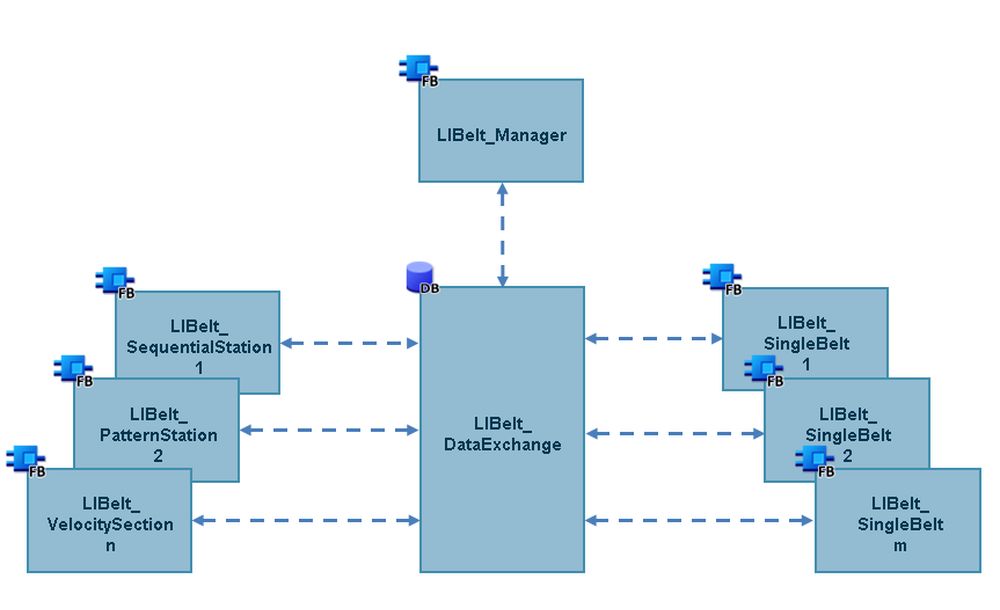
LIBelt is presented as a ready-to-run solution that is set up through parameters. Its structure is modular:
- LIBelt_Manager coordinates all modules and checks their interconnection at startup.
- LIBelt_SingleBelt controls each physical belt.
- The station blocks represent loading, unloading or processing points, product pattern creation and sections with a defined velocity.
The number of belts and stations is limited only by the CPU in use. The library includes manual and automatic modes with separate dynamics, automatic preparation (homing and move to the initial position), manual jog and positioning for commissioning, collision monitoring, support for incremental and absolute encoders, and an automatic check of the technology object configuration.
What’s new in version 1.2
- Scope of application is now STEP 7 Basic/Professional V20.
- Support for SIMATIC S7-1200 G2.
- Two new station types: LIBelt_SeqPatternStation and LIBelt_SyncStationCamming.
- New
openBrakeinput on LIBelt_SingleBelt. - New inputs for additional dynamics on LIBelt_VelocitySection.
Using LIBelt_SyncStationCamming on an S7-1200 G2 requires firmware 4.0 or newer, and therefore STEP 7 V21 or later.
Examples included
The manual documents three scenarios with their configuration: grouping randomly arriving products, use as a stacker, and an application with two unloading steps. The library and manual can be downloaded free of charge from Siemens Industry Online Support (entry ID 48812744). Siemens notes that it is a non-binding application example, and that users must check and adapt it to their own system.